When you click on links to various merchants on this site and make a purchase, this can result in this site earning a commission. Affiliate programs and affiliations include, but are not limited to, the eBay Partner Network.
100% GenuineBest PricingFast ShippingBEYOND OUTDOOR
LIVE WITHOUT LIMITS
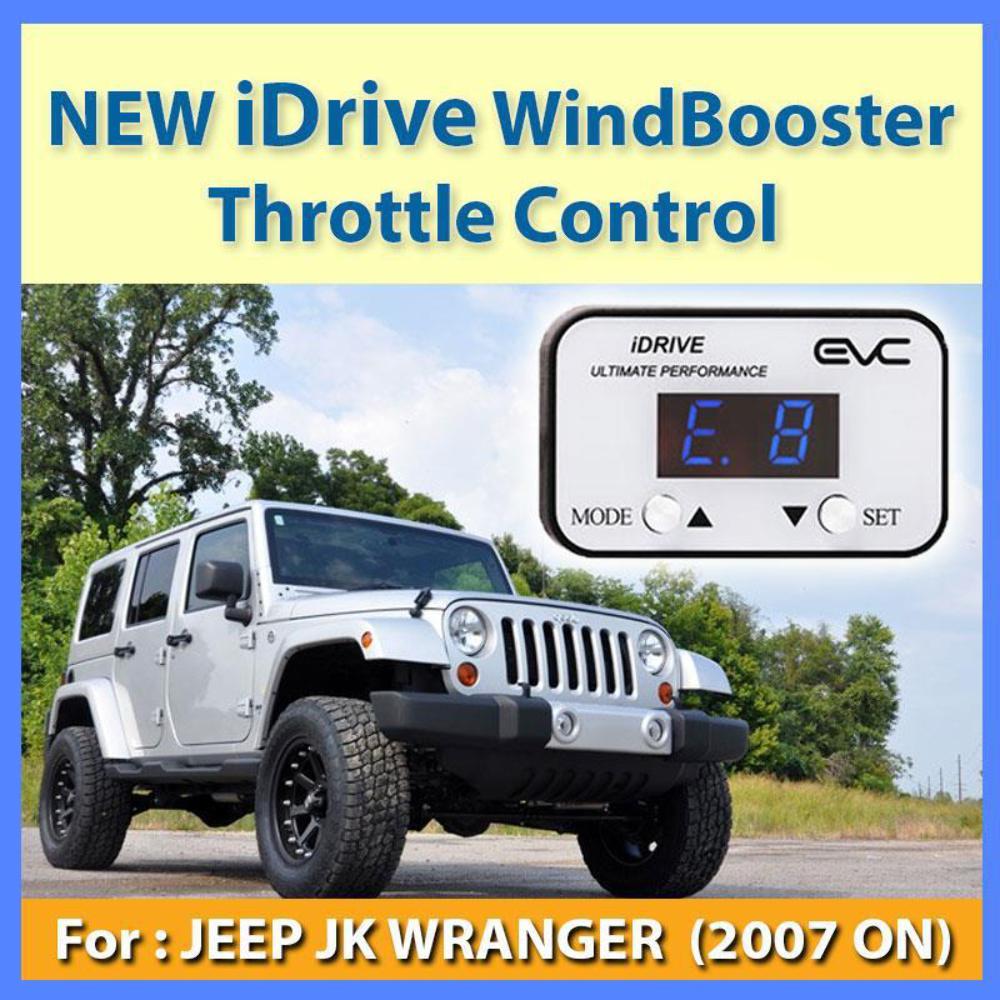
LimitedOFFERNEW IDRIVE WINDBOOSTER THROTTLE CONTROL - JEEP JK WRANGER 2007 ON Why iDRIVE?Rather than a traditional accelerator cable, many modern vehicles use 'fly by wire' throttle technology. This system relies on a sensor that measures the pedal pressure and position and sends a signal to the vehicle's engine computer which converts to acceleration. Many of these fly by wire systems have a noticeable delay. iDRIVE allows you to tune the signal from the accelerator pedal with multiple inbuilt settings to ensure you find a setting that suits your driving style, although there are other products on the market that can offer this performance. So what makes iDRIVE different?iDRIVE includes an automatic control function that changes the level of throttle performance based on pedal pressure. So if you are in traffic and accelerating gently the iDRIVE will select setting 1. If you are accelerating hard to overtake, towing a heavy trailer, or just having fun the iDRIVE will select 9. The result is the smoothest aftermarket control module on the market. We are so confident you will love your iDRIVE if you don't we will give you your money back. How It Works?'Multiple settings ensures iDRIVE suits everyone's driving style'Eco Mode:ECO mode is designed for economy by reducing the accelerator response time. Also handy when you are on the trails and looking for a bit more throttle control when crawling.Ultimate Mode:Ultimate Mode offers 9 sensitivity levels, this allows the driver to tune the controller to the desired level of sensitivity.Choose level 9 and grip the steering wheel tight or hit level 1 for a gentle smooth acceleration.AC Mode:Automatic control mode automatically selects the sensitivity level based on pedal pressure. If you are in traffic and accelerating gently the iDRIVE will automatically choose a reduced level of throttle response. If you accelerate hard for overtaking or just even just for fun the iDRIVE will choose a mode with an increased level of throttle response. Automatic Control mode is what makes iDRIVE the most intelligent throttle controller on the market. Installation instructions:
- Turn ignition off.
- Unplug the connector plugged into the accelerator pedal assembly.
- Plug the iDRIVE connector into the vehicle’s accelerator pedal. Be cautious not to force into position as this may result in bent pins in the plug. iDRIVE connector should fit easily into position. Although removing the accelerator pedal from the firewall is not required, it may make access to the plug easier.
- Re-fit connector into the iDRIVE.
- Using cable ties supplied, securely mount the iDRIVE cable in a position that will not affect the operation of the pedals.
- Mount the control module on the dash in a position that is easy to access. You may want to check the position at night to ensure the display doesn’t affect night driving.
We accept payment by any of the following methods:
Internet Transfer, Bank Deposit and all Major Credit Cards through Paypal
If you are making a bank payment, pleave leave only your exact username as a reference (otherwise your payment cannot be cleared)
We offer FREE shipping for most products and metro area, however, for NT, QLD North, WA and other country area, surcharge could be required!
Your order will be dispatched within 1 working day of receiving payment is available on weekdays from 10:00 to 5:30PM and saturday by appointment
Beyond Outdoor is not directly liable for any loss and/or damages during delivery.
Returns will not be issued for change of mind or incorrect purchases so choose carefully.
A refund or replacement will not be provided if products are being misused, mishandled or mistakenly installed.
To make a claim, you need to describe the problem precisely and provide evidence to support your claim,
and state whether you are requesting a replacement, repair, refund or credit.
For items which arrived damaged, you need to notify us within 24 hours
with photo and video evidence of the transit damage,then from there we will assess the correct procedures moving forward.
For warranty issues products have to be sent back to us, in original packaging and with all manuals and accessories, with copy of invoice and description of fault.
Please contact us if there are any issues or problems with your item.
Returns that are damaged or soiled may not be accepted and may be sent back to you and/or a refund
100% GenuineLocal Stock
Fast ShippingWhy iDRIVE? Rather than a traditional accelerator cable, many modern vehicles use 'fly by wire' throttle technology. This system relies on a sensor that measures the pedal pressure and position and sends a signal to the vehicle's engine computer which converts to acceleration. Many of these fly by wire systems have a noticeable delay. iDRIVE allows you to tune the signal from the accelerator pedal with multiple inbuilt settings to ensure you find a setting that suits your driving style, although there are other products on the market that can offer this performance. So what makes iDRIVE different? iDRIVE includes an automatic control function that changes the level of throttle performance based on pedal pressure. So if you are in traffic and accelerating gently the iDRIVE will select setting 1. If you are accelerating hard to overtake, towing a heavy trailer, or just having fun the iDRIVE will select 9. The result is the smoothest aftermarket control module on the market. We are so confident you will love your iDRIVE if you don't we will give you your money back. How It Works? 'Multiple settings ensures iDRIVE suits everyone's driving style' Eco Mode: ECO mode is designed for economy by reducing the accelerator response time. Also handy when you are on the trails and looking for a bit more throttle control when crawling. Ultimate Mode: Ultimate Mode offers 9 sensitivity levels, this allows the driver to tune the controller to the desired level of sensitivity.Choose level 9 and grip the steering wheel tight or hit level 1 for a gentle smooth acceleration. AC Mode: Automatic control mode automatically selects the sensitivity level based on pedal pressure. If you are in traffic and accelerating gently the iDRIVE will automatically choose a reduced level of throttle response. If you accelerate hard for overtaking or just even just for fun the iDRIVE will choose a mode with an increased level of throttle response. Automatic Control mode is what makes iDRIVE the most intelligent throttle controller on the market. Installation instructions: 1--Turn ignition off. 2--Unplug the connector plugged into the accelerator pedal assembly. 3--Plug the iDRIVE connector into the vehicle’s accelerator pedal. Be cautious not to force into position as this may result in bent pins in the plug. iDRIVE connector should fit easily into position. Although removing the accelerator pedal from the firewall is not required, it may make access to the plug easier. 4--Re-fit connector into the iDRIVE. 5--Using cable ties supplied, securely mount the iDRIVE cable in a position that will not affect the operation of the pedals. 6--Mount the control module on the dash in a position that is easy to access. You may want to check the position at night to ensure the display doesn’t affect night driving. BEYOND OUTDOOR
LIVE WITHOUT LIMITS
NEW IDRIVE WINDBOOSTER THROTTLE CONTROL - JEEP JK WRANGER 2007 ON Why iDRIVE?Rather than a traditional accelerator cable, many modern vehicles use 'fly by wire' throttle technology. This system relies on a sensor that measures the pedal pressure and position and sends a signal to the vehicle's engine computer which converts to acceleration. Many of these fly by wire systems have a noticeable delay. iDRIVE allows you to tune the signal from the accelerator pedal with multiple inbuilt settings to ensure you find a setting that suits your driving style, although there are other products on the market that can offer this performance. So what makes iDRIVE different?iDRIVE includes an automatic control function that changes the level of throttle performance based on pedal pressure. So if you are in traffic and accelerating gently the iDRIVE will select setting 1. If you are accelerating hard to overtake, towing a heavy trailer, or just having fun the iDRIVE will select 9. The result is the smoothest aftermarket control module on the market. We are so confident you will love your iDRIVE if you don't we will give you your money back. How It Works?'Multiple settings ensures iDRIVE suits everyone's driving style'Eco Mode:ECO mode is designed for economy by reducing the accelerator response time. Also handy when you are on the trails and looking for a bit more throttle control when crawling.Ultimate Mode:Ultimate Mode offers 9 sensitivity levels, this allows the driver to tune the controller to the desired level of sensitivity.Choose level 9 and grip the steering wheel tight or hit level 1 for a gentle smooth acceleration.AC Mode:Automatic control mode automatically selects the sensitivity level based on pedal pressure. If you are in traffic and accelerating gently the iDRIVE will automatically choose a reduced level of throttle response. If you accelerate hard for overtaking or just even just for fun the iDRIVE will choose a mode with an increased level of throttle response. Automatic Control mode is what makes iDRIVE the most intelligent throttle controller on the market. Installation instructions:
- Turn ignition off.
- Unplug the connector plugged into the accelerator pedal assembly.
- Plug the iDRIVE connector into the vehicle’s accelerator pedal. Be cautious not to force into position as this may result in bent pins in the plug. iDRIVE connector should fit easily into position. Although removing the accelerator pedal from the firewall is not required, it may make access to the plug easier.
- Re-fit connector into the iDRIVE.
- Using cable ties supplied, securely mount the iDRIVE cable in a position that will not affect the operation of the pedals.
- Mount the control module on the dash in a position that is easy to access. You may want to check the position at night to ensure the display doesn’t affect night driving.
100% GenuineBest PricingFast ShippingPayment
We accept payment by any of the following methods:
Internet Transfer, Bank Deposit and all Major Credit Cards through Paypal
If you are making a bank payment, pleave leave only your exact username as a reference (otherwise your payment cannot be cleared)
Shipping
We offer FREE shipping for most products and metro area, however, for NT, QLD North, WA and other country area, surcharge could be required!
Your order will be dispatched within 1 working day of receiving payment is available on weekdays from 10:00 to 5:30PM and saturday by appointment
Beyond Outdoor is not directly liable for any loss and/or damages during delivery.
Warranty
Returns will not be issued for change of mind or incorrect purchases so choose carefully.
A refund or replacement will not be provided if products are being misused, mishandled or mistakenly installed.
To make a claim, you need to describe the problem precisely and provide evidence to support your claim,
and state whether you are requesting a replacement, repair, refund or credit.
For items which arrived damaged, you need to notify us within 24 hours
with photo and video evidence of the transit damage,then from there we will assess the correct procedures moving forward.
For warranty issues products have to be sent back to us, in original packaging and with all manuals and accessories, with copy of invoice and description of fault.
Please contact us if there are any issues or problems with your item.
Returns that are damaged or soiled may not be accepted and may be sent back to you and/or a refund
Fast Shipping Why iDRIVE?Rather than a traditional accelerator cable, many modern vehicles use 'fly by wire' throttle technology. This system relies on a sensor that measures the pedal pressure and position and sends a signal to the vehicle's engine computer which converts to acceleration. Many of these fly by wire systems have a noticeable delay. iDRIVE allows you to tune the signal from the accelerator pedal with multiple inbuilt settings to ensure you find a setting that suits your driving style, although there are other products on the market that can offer this performance. So what makes iDRIVE different?iDRIVE includes an automatic control function that changes the level of throttle performance based on pedal pressure. So if you are in traffic and accelerating gently the iDRIVE will select setting 1. If you are accelerating hard to overtake, towing a heavy trailer, or just having fun the iDRIVE will select 9. The result is the smoothest aftermarket control module on the market. We are so confident you will love your iDRIVE if you don't we will give you your money back. How It Works?'Multiple settings ensures iDRIVE suits everyone's driving style'Eco Mode:ECO mode is designed for economy by reducing the accelerator response time. Also handy when you are on the trails and looking for a bit more throttle control when crawling.Ultimate Mode:Ultimate Mode offers 9 sensitivity levels, this allows the driver to tune the controller to the desired level of sensitivity.Choose level 9 and grip the steering wheel tight or hit level 1 for a gentle smooth acceleration.AC Mode:Automatic control mode automatically selects the sensitivity level based on pedal pressure. If you are in traffic and accelerating gently the iDRIVE will automatically choose a reduced level of throttle response. If you accelerate hard for overtaking or just even just for fun the iDRIVE will choose a mode with an increased level of throttle response. Automatic Control mode is what makes iDRIVE the most intelligent throttle controller on the market. Installation instructions:
- Turn ignition off.
- Unplug the connector plugged into the accelerator pedal assembly.
- Plug the iDRIVE connector into the vehicle’s accelerator pedal. Be cautious not to force into position as this may result in bent pins in the plug. iDRIVE connector should fit easily into position. Although removing the accelerator pedal from the firewall is not required, it may make access to the plug easier.
- Re-fit connector into the iDRIVE.
- Using cable ties supplied, securely mount the iDRIVE cable in a position that will not affect the operation of the pedals.
- Mount the control module on the dash in a position that is easy to access. You may want to check the position at night to ensure the display doesn’t affect night driving.