When you click on links to various merchants on this site and make a purchase, this can result in this site earning a commission. Affiliate programs and affiliations include, but are not limited to, the eBay Partner Network.
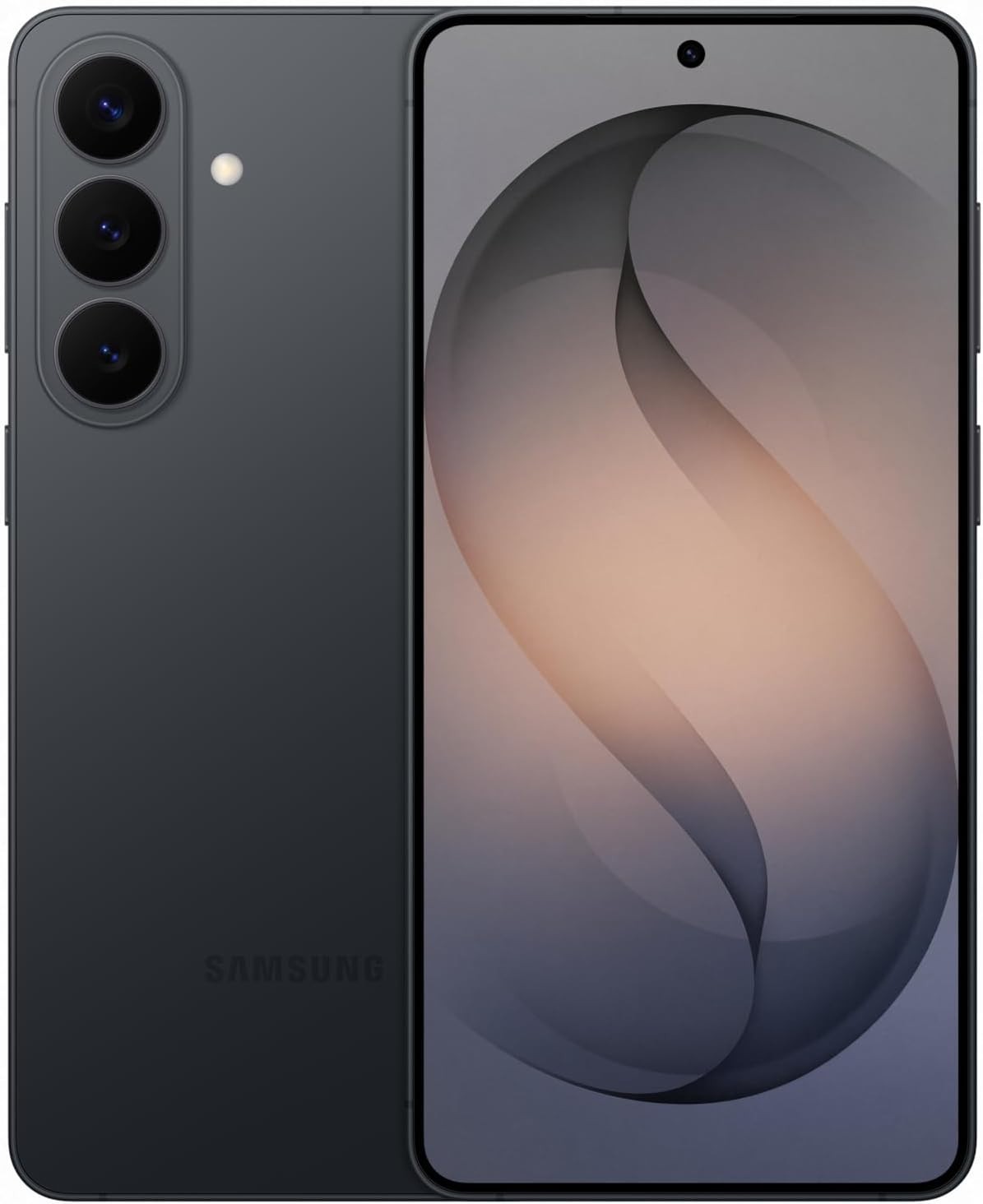
Samsung Galaxy S26 – Key Features & Specifications
🚀 Next-Level Performance
- Snapdragon® 8 Elite Gen 5 for Galaxy Processor
- 12GB RAM for powerful multitasking and smooth performance
- Up to 512GB internal storage options
- Android 16 with One UI 8.5 for a smarter, more personalized experience
✨ Stunning Display
- 6.3\" Dynamic AMOLED 2X Display
- Adaptive 120Hz refresh rate for ultra-smooth scrolling and gaming
- 2600 nits peak brightness for clear viewing outdoors
- HDR10+ support for vibrant colors and deeper contrast
📸 Professional-Level Camera System
- 50MP Main Camera with advanced image processing
- 12MP Ultra-Wide Camera for breathtaking landscapes and group shots
- 10MP Telephoto Camera with 3x Optical Zoom
- 12MP Front Camera for high-quality selfies and video calls
- Record stunning 8K video and capture every detail
🤖 Galaxy AI Intelligence
- AI-powered photo editing and productivity tools
- Smarter search, communication, and everyday assistance
- Enhanced creativity with intelligent features built into One UI
🔋 All-Day Battery & Fast Charging
- 4,300 mAh battery designed for everyday power
- Super Fast Charging support
- Wireless charging capability
🛡 Premium Design & Durability
Sleek premium Galaxy designIP68 water and dust resistance5G connectivity for fast downloads and streamingWi-Fi 7 and Bluetooth 6.0 support• Fully Unlocked
• Works with all local & international carriers
• We\'ve verified that this item has been inspected, tested, and cleaned by a qualified seller.
• Appearance: Has moderate signs of wear.
• Performance: Fully functional. Works like new.
• Warranty: One-year warranty serviced by Allstate.
• Packaging: Comes in new, generic packaging with original or new, generic accessories (if applicable).
• Minimum battery health: 80%
• We\'ve verified that this item has been inspected, tested, and cleaned by a qualified seller
• Performance: Fully functional – works like new
• Professionally tested and certified
• 21-Point Inspection completed
• 10-Point functional testing, including:
– Charging & battery performance
– LCD & touchscreen
– Wi-Fi & Bluetooth
– Calling & texting
– All major key functions
• Fully unlocked & ready to activate
• Professionally cleaned, tested, graded, and securely packaged
• Quality Control labeled
• IMEI recorded and verified
• Refurbished Protection powered by Allstate
• 24/7 claim support
• Many claims approved instantly
• Repair, replacement, or reimbursement if repair isn’t possible
• Device
• Sync cable
• Ships within 24 hours after payment clears
• Orders placed before 9:00 AM CDT usually ship same business day
• Delivery in 2–3 business days
• Signature may be required for high-value items
• No PO Boxes (physical address required)
• All -approved payment methods accepted
• Returns accepted per policy
• Please remove iCloud / Google / Samsung accounts before returning
Find the item in My under Purchase History and select Return this item from the More actions drop-down menu.
Select the reason for the return. Depending on the seller’s return policy, you may be put in touch with the seller directly.
Upload photos if helpful to document the item’s condition.
• Up to 10 photos (PNG, JPEG, BMP, or GIF)
• Max size: 5MB per photo
• Photos are visible to both the seller and Customer Service
Pack the item carefully, include the packing slip, apply the label, and ship the item back.
• Item must be returned within 5 business days of requesting the return
• Tracking is strongly recommended
The return request must be closed before a replacement is dispatched.
⚠️ Failure to do so may result in a restocking fee.
*** Returns are processed within 24–48 hours after the parcel is received.
*** Excludes weekends and holidays.
Go to iCloud.com and log in
Go to Find My iPhone
Select “All Devices” (top middle)
Select the device returned to us
Click “All Devices” again and tap the small “X” next to the device
Hover over the “X”, select Remove, and confirm
DO NOT ERASE THE DEVICE — ONLY REMOVE IT
Press and quickly release Volume Up
Press and quickly release Volume Down
Press and hold the Side Button
Release when the Apple logo appears
Press and hold the Side Button on the Apple Watch until the Apple logo appears
Hold your iPhone near the Watch until the pairing screen appears
Tap Continue
Select Set Up for Myself
If pairing doesn’t appear, open the Watch app → Start Pairing
Use your iPhone camera to scan the pattern on the Watch screen
Open Settings
Select Passwords & Accounts
Under Accounts, select the Google account
Tap Remove account
Go to Settings → Accounts and backup
Select Manage accounts
Tap your Samsung account
Select Remove account
• Message Amazing Wireless LLC through
• Response within 24 business hours (weekdays)