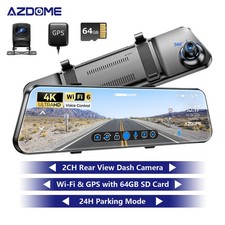
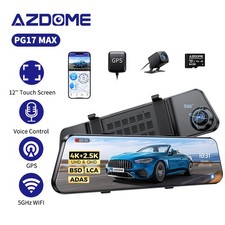
(To avoid fire, our product does not install a large capacity battery, so if you want it to work for you when the car is parked, you need to install a hard wiring kit. If you need it, you can buy it from this style=\"box-sizing: border-box; overflow-wrap: break-word !important; word-break: break-word !important;\">
Superior Night Vision
1080P HD Backup Camera
The PG17-4K Rear View Camera supports 170°+150° front and rear shooting angles to cover the front and rear of the vehicle, capturing more details and panoramic views. It is also equipped with IP67 waterproof device, which is extremely durable. In addition to this, it also features reverse assist and vertical flip function, the rear view camera will automatically display the assist line on the screen for safe parking.
Smart Voice Control
- Control the rear mirror dash camera with voice command. It is easy to start or stop recording, capture still pictures, etc, ensuring a safer and convenient driving experience.
Driving Fatigue Alert
When dashcam working for 1/2/4 hours, a sound will be made to remind you to be awake. This function aims to warn you to take a break to ensure driving safety. Please note that continuous driving may cause fatigue for a long time, so it is recommended to stop and rest at the appropriate time to maintain alertness and safety.
Adjustable Rear Cam
Adjustable rear cam display allows rear cam to adapt to different installation methods of different vehicle types.
4 Display Modes
AZDOME PG17-4K Mirror dash cam has Smart split-screen function, support the same screen display of front and rear camera images.
4 Display Modes to choose from:
-Front Camera
-Rear Camera
-Split Screen
-Normal Mirror/Screen Saver
Note: Press the POWER button to turn off the display as a normal mirror, in any mode, the front and rear is recording simultaneously.
PG17-4K Standard Packing List:1× PG17 4K Rear View Mirro Camera
1× Waterproof 1080P Rear Camera
1× Car Charger (Type-C USB 3.5M/12ft)
1× External GPS Module
1× Long Straps
1× Short Straps
1× AZDOME 64GB SD Card
1× Pry Tool
1× Cable Clips
1× Cleaning Cloths
1× Pre-Moistened Lens Wipes
1× User Manual
1× Reflective Protective Film
How to connect to WiFi?
The content of the following two pictures and videos can help you to connect the WIFI of the car recorder, if there are more questions about this step, please contact customer service, thank you!
Easy to install:You can install it yourself according to the instructions in the manual without hiring a professional, which can save you installation costs.
Customer Questions & AnswersQ1: What is a WiFi Feature?
A: The WiFi feature has been designed so you can pair your dash camera wirelessly with your smartphone and access your recording instantly from the dash cam. Here you can view, download and share your videos easily with your friends and family. Just like how you would connect your Bluetooth speaker to your smartphone for wireless music play, the same way dash cameras use WiFi signal (instead of a Bluetooth) to pair your smartphone with AZDOME PG17-4K.
Q2: Can I watch the videos around my car remotely?
A: NO.AZDOME dash cam is NOT made to broadcast footage over the cloud or internet. It is NOT a cloud or an IP camera and it is NOT meant to do that. You can get live video and footage on AZDOME dash cam's APP as long as you stay within the 10FT range from the dashcam.
Q3: What is the WiFi Range?
A: The WiFi signal range is about 10FT when there are NO obstructions in the middle. Please NOTE that just like your home WiFi network, you don't have WiFi signal outside your home, the same way, WiFi range is 10FT from this small device.
Q4: Camera turns ON/ OFF automatically?
A: Ensure that the output current can reach 5V/2.5A and use our car charger.And ensure that the cabin camera and the rear camera are connected correctly. It is to improve stability that the dashcam reboots automatically once if it detects that there are different cameras connected.
Q5: The poweris on, can not be turned on
A: If the Mirror dash cam does not function normally,try restarting it. To restart the Mirror dash cam with a flattened paper clip, press the small“Reset”hole on top of the device next to the USB port.
Q6: Video does not play smoothly?
A: You are viewing high-bit rate version of video files. General computer configuration may have problem with faster data processing. Please record videos at lower resolution and try again. If this does not solve the problem, Please contact our customer service.
Q7: Device fails to record video or take a picture
A: Plug in the card. If the card is not recognized, unplug it and plug it in again, or clean up any contamination from the card contacts. If not solved, format the memory card in dash cam.
Q8: All buttons fail to function
A: Press Reset Key to restart the device; If not solved, remove the memory card or rear camera to confirm if the accessories have a effect on it.
Q9: Why the rear cam image is converse on the screen?
A: According to your habit, please set the function named“Rear Video Mirror”at OFF.
Q10: Why dash cam can't get the GPS signal?
A: 1.Check if the GPS icon status on the screen (it will take 1-3minutes to get GPS signal successfully)
2.Depending on the vehicle and the location of the GPS signal can be blocked due to strong radio interference of other electronic devices in the car, the cloudy/rainy weather or mountains, tunnels, tall buildings on both sides of road etc.
3.Please check if GPS works by taking the GPS Module from the car to outside. If it works then there must be a heavy interference in the car,for example thick car Explosion-proof membrane, metal item and etc.
Q12: Dash cam will be warm
A: lt is normal. A dash cam of this caliber is a pretty high-tech piece of equipment.When you think about it from an engineering perspective, capturing high quality full HD video takes alarge amount of computer processing power. Heat is the by-product of all that data processingthat is going on. But not to worry.The case of the Dash cam itself is actually used as a heat-sink (notice the nice vents you see along the top and bottom of these models), so that's why you may notice it is warm or hot to the touch. Don't worry, this is normal,and your AZDOME is operating as designd.
Q13: Video has no sound?
A: Ensure that "RecordAudio" icon is turned ON. Ensure that "Time Lapse Parking Mode" setting is turned OFF within the Menu.
Shipping Information:1. Items will be shipped within 1 business day on payment received.
2. Item are shipped from Warehouse of US, Estimated Delivery Time: About 1-5 working days
Our office hours are 9:00 a.m to 6:00 p.m (GMT +8) of Monday to Saturday.
And our Office is closed on Sunday and public holidays.
We apologize for the late reply during the holidays.
Rear View Mirror Dash Cam WiFi 10" Touch Screen 1080P Dual Car Cameras Park Mode
39.99 USD
Free shipping
LINGDU 2.5K+1080P Front and Rear 10" Mirror Dash Camera 5G WiFi GPS Night Vision
29.99 USD
69.99 USD
Free shipping
57%
offAZDOME 3'' 2K Dash Cam WIFI Car Camera Night Vision G-Sensor 24H Parking Monitor
35.99 USD
Free shipping
4K 3-Channel Dash Cam Front+Rear+Cabin Dash Camera WiFi&GPS APP 24H Parking Mode
56.99 USD
59.99 USD
Free shipping
5%
offRear View Mirror Dash Cam 10"Full Touch Screen WiFi 1080P Front and Rear Car DVR
39.99 USD
Free shipping
10" WiFi Rear View Mirror Dash Cam 1080P Front and Rear Car Cameras Parking Mode
39.99 USD
Free shipping
AZDOME 4K 2CH Dash Cam ADAS WiFi GPS Parking Mode G-sensor Night Vision GS63 Pro
119.99 USD
Free shipping
LINGDU Dash Cam WiFi GPS 4K+2K Front&Rear Dash Camera Parking Mode 64GB TF Card
47.49 USD
49.99 USD
Free shipping
5%
offAZDOME JYX05 Dash Cam Hardwire Kit USB Type C Hard Wire Kit 11.5ft forPG19X M580
25.99 USD
Free shipping
5K 2CH Dash Cam 5GWiFi GPS 4K+2K Front and Rear Camera APP Parking Mode G-sensor
47.49 USD
49.99 USD
Free shipping
5%
off